Doug Lane

SQL Server Entertainer

  • GitHub
  • LinkedIn
  • Twitter
  • YouTube
  • Blog
  • About Doug

Archives for March 2013

Reporting Services 2012 Bug Causes Export to Excel Failure

March 14, 2013 by Doug Lane

Finally, FINALLY, I get to tell my boss the report subscriptions broke and it’s the server’s fault.

Here’s what happened: I took a report that ran perfectly on a SQL 2008 server and deployed it to Reporting Services on a SQL 2012 server. I tried to export it to Excel and got this delightful little message.
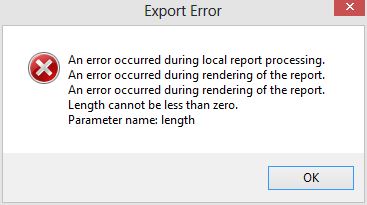
ExcelSSRSError
This particular report had no parameters and no custom code, so I was confident in ruling out an error on my part. I tried to work around it by exporting from the print layout, but still got the same error.
I then checked the Reporting Services log files and found this:

WARN: Microsoft.ReportingServices.ReportProcessing.UnhandledReportRenderingException: An error occurred during rendering of the report. —> Microsoft.ReportingServices.OnDemandReportRendering.ReportRenderingException: An error occurred during rendering of the report. —> System.ArgumentOutOfRangeException: Length cannot be less than zero.

While the detail of that message didn’t help me deduce anything new, it did give me more precise phrasing with which to search. That led me to find this confession connect item from Microsoft: SSRS 2012 Export to Excel Footer bug. This is the Connect Team’s response to the item:

TheyBrokeExcel

Although there aren’t any workarounds added to the item, there’s one outlined in the initial item description. It says to place footer text in an image and drop that into the footer instead of a text box. I tried a number of other workarounds using background images, tables, and rectangles, but this is the only one I’d say was reasonably successful.
A few things to keep in mind if you’re going to need this workaround:
  • Save your text-as-image at a print quality resolution. 300 dpi is good. My company recently standardized headers and footers in our reports and we discovered the chunky, almost unreadable output of a 72 dpi image.
  • You still have 255 characters that will render. As the Connect Team comment says, some of that will be lost to the formatting tags. Still, if you put information like report date or page numbers, they’ll likely fit and render properly. It’s the long text like disclaimers and footnotes that you’ll need to use an image for.
  • This is only for SQL Server 2012. I’ve tested it and versions 2008 and 2008 R2 don’t fail this way. Consider passing broken reports through your 2008/2008 R2 report servers if that’s an option.

I like this workaround as a general practice anyway. At my company, we’re using images for the disclaimer in our report footers. If the text needs updating, we simply update the image and the reports that call it pick up the new image automatically. This technique is very simple to implement. Just do the following (I’m using SSDT):

  1. Right-click on the Reporting Services project name and choose Add > Existing Item.
  2. Change the file type drop-down to “All Files”.
  3. Find the image you want to use and click “Add”. Unfortunately, there isn’t a Miscellaneous folder like there are in SSIS and SSAS projects. Instead, your image will get added to the Reports folder.
  4. Add a new image to the report. The Image Properties window will appear.
  5. Change the “Select the image source” drop-down list to External.
  6. Choose the image from the “Use this image” drop-down list. Images attached to the project will be at the top of the drop-down list.
  7. Click “OK”.

The Connect item is “Closed as Fixed”, meaning they made sure future versions won’t have this issue. However, this doesn’t mean there’s a fix available for it right now. For the time being, the workaround is the best way to get the export to Excel function to not error out. This is a big enough deal that I hope the fix is coming in the next service pack, and we won’t have to live with it until the next full product version.
 

Filed Under: Reporting Services

Five SQL Server Bloggers to Watch in 2013

March 5, 2013 by Doug Lane

I’d like to bring your attention to five bloggers I’ve begun following over the last year, and who I anticipate will be creating outstanding content in 2013. They have the following in common (as of this writing):

  1. Fewer than 1,000 followers on Twitter
  2. 24 or more blog posts in 2012 (average 2x/month)
  3. Not a SQL Server MVP, MCM, or Microsoft employee

In other words, they’re doing great work but don’t yet have the great name recognition to go along with it. Expect that to change in 2013. Here is the list of five, in no particular order:

Mike Fal

mikefal.net

Areas of Emphasis: DBA, PowerShell, Presenting

Blog: mikefal.net

Blog posts in 2012: 35

Twitter handle: @mike_fal

Twitter followers: 474

Why you should read Mike’s blog: Mike has really plunged into community involvement over the last year. He recently became the VP of Events for the Denver SQL Server User Group — a perfect fit as many of his posts are on public speaking. He’s unafraid to voice a strong opinion, yet he acknowledges when he’s relatively new to a subject.

The one post you don’t want to miss: Core Mechanics (setting up Windows Server Core as a platform for SQL Server 2012)


Julie Koesmarno

mssqlgirl

Areas of Emphasis: BI

Blog: mssqlgirl.com

Blog posts in 2012: 32

Twitter handle: @mssqlgirl

Twitter followers: 567

Why you should read Julie’s blog: Whether it’s a technical subject, a SQL Saturday recap, or an editorial, Julie’s posts are extensive and detailed without being unnecessarily wordy. Because she’s blogging about hot BI topics (e.g., PowerPivot, Power View, and DAX), she’ll keep you informed on the changing BI landscape. One really nice touch: Her technical posts end with “Wrap-Up” and  “Further Reading” sections.

The one post you don’t want to miss: Hybrid Mode in Tabular BI Semantic Model


Matt Velic

mattvelic

Areas of Emphasis: Virtualization, Cloud

Blog: mattvelic.com

Blog posts in 2012: 29

Twitter handle: @mvelic

Twitter followers: 799

Why you should read Matt’s blog: Matt recently started a new job where he’s working with SQL Server 2012 hosted on Amazon Web Services (AWS). Before that, he worked as a DBA for the Democratic National Committee. He writes about that experience without getting too political, so you’ll enjoy it regardless of your political leanings. I look forward to reading a lot more from Matt about AWS in 2013.

The one post you don’t want to miss: Building a Virtual Lab (series)


Mark Vaillancourt

markvsql

Areas of Emphasis: BI

Blog: markvsql.com

Blog posts in 2012: 31

Twitter handle: @markvsql

Twitter followers: 739

Why you should read Mark’s blog: If you struggle to learn MDX, start with his Decathlon series. Mark uses a blend of comedy, geekiness, and easy-to-digest explanations to make the abstract seem simple. His writing reads like a parallel universe BOL where you don’t get bored or confused. Mark is also a PASS Regional Mentor for Canada, so he shares PASS news and insights from time to time.

Oh, and #markvsqlIsHandsomeAndWitty (follow him on Twitter and you’ll catch on).

The one post you don’t want to miss: MDX Decathlon (series)


Dev Nambi

DevNambi

Areas of Expertise: Data Science, Database Development

Blog: devnambi.com

Blog posts in 2012: 17

Twitter handle: @devnambi

Twitter followers: 315

Why you should read Dev’s blog: I bent the rule about the number of blog posts for Dev because his blog posts are more like research papers. He’s exploring the emerging field of data science by taking data science college courses and doing his own DS projects that solve real-world problems using real-world data.

Plus, Dev is a smart, smart guy.

The one post you don’t want to miss: Buy a Car with Data


Is there someone else the SQL Server community ought to be reading but isn’t? Leave a comment and tell us who we’re missing!

Filed Under: Blogging

Subscribe now!

Don't miss new posts as they publish. Enter your e-mail address to subscribe!

Your e-mail address will stay quietly between us, like that time I set the carpet on fire by accident.

Copyright © 2026 · Outreach Pro on Genesis Framework · WordPress · Log in