
Doug Lane

SQL Server Entertainer

  • GitHub
  • LinkedIn
  • Twitter
  • YouTube
  • Blog
  • About Doug

Archives for January 2011

I’m bringing sexy back [to my reports]

January 21, 2011 by Doug Lane

Socks + Sandals
Wrong in so many ways

I’m generally ashamed of my wardrobe from 1997-2004.  Socks with sandals, too-short golf shorts.  Oh, it was heinous.  I found the cure to bad style was simply to pay more attention to what looks good on others, and start wearing more of that.  Much like my fashion sense, my sense of style for reports has evolved over the years into something a little more sophisticated.  I take almost as much pride in a report or web page that looks clean as I do one that runs clean.  Through lots trial and error — mostly error, it seems — I’ve found a few schemes that work well.  I want to share the schemes I use, along with the code to implement them.

I like these because with only one hue (or is it tint? See, I told you I’m not a graphic designer) you can use other colors to draw attention to important information, a la Stephen Few.  I prefer greens and blues (I dress the same way — shocking) because they’re unprovocative and people seem to prefer them over warm tones in reports.

Blue

#DEF1FA
Highlight row/column
#BCD7E4
Header/Footer
#9AC2D6 #6FA4BF #437C99

Green

#EAF8D2
Highlight row/column
#D7E4BC
Header/Footer
#C2D69A #A4BF6F #688038

I rarely use the last darkest two colors in the scheme because black text starts to blend into the background, especially when it’s printed using color laser.  It’s better to use white text on the darkest one.  The lightest three colors are best for header/footer rows and sub-total/total columns in a table.

Note I’m using HTML color codes, not .Net named colors.  I’ll elaborate on that in a separate post some other time, but for now, I’ll just mention it involves Find & Replace in Visual Studio.

The sets of five are also good for illustrating depth or degrees of severity, like a heatmap. Here’s an example where Thursday has a lot of something and Wednesday has a little: 
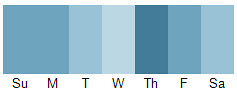
Heat Map Color Scheme

If you want to plug them into a chart, just add an expression like this one to the Fill attribute in the series properties of the chart:

=IIf(Fields!val.Value < .2, “#DEF1FA”,
IIf(Fields!val.Value < .4, “#BCD7E4”,
IIf(Fields!val.Value < .6, “#9AC2D6”,
IIf(Fields!val.Value < .8, “#6FA4BF”,
IIf(Fields!val.Value >= .8, “#437C99”, “Black”)))))

And there you have it.  Style being a matter of individual taste, these themes don’t appeal to everyone.  That said, of all the themes I’ve come up with so far, these have been the most popular with my customers.  I hope you find them useful too.

Filed Under: Reporting Services

Knowing your data is better than believing it

January 5, 2011 by Doug Lane

“You’re sure, or you know?”
-Stanley Tucci in the BBC movie “Conspiracy“

As developers, DBA’s, and analysts, we’ve all been asked this question in some form at one time or another.  We know the feeling of queasy uncertainty that comes with responding, “I’m sure.”  We know the sturdy confidence that comes with responding, “I know.”  So why would we ever opt to answer anything but, “I know”?

There are advantages to being sure about our work:

  • We get more work done in the same amount of time.
  • We deliver work with low risk of error.
  • We develop a reputation for delivering work faster or ahead of schedule.

But consider the consequences:

  • Our work is more likely to need revision, so the perceived time savings is an illusion.
  • Business costs increase because of decisions made on our errant data.

And most importantly…

  • We develop a reputation as producing unreliable output.
Be careful, stick figure!
Don’t say we didn’t warn you

In a mission-critial environment, this last bullet point is really all that matters.  As soon as your company can count on not counting on you, you’re doomed.  Your career path there consists of two feet of sidewalk and a large brick wall guarded by a mean dog.

Fortunately, if you haven’t done incalculable damage to your reputation or your company, here are three things you can start doing immediately to remedy the situation.

1. Ask questions until you know the question being asked

There’s a process many of us have been through that goes something like this:

(client sketches dataset -> you query -> you report -> client asks why it doesn’t look right -> missing parameter discovered)

The answers are right but the question is wrong.  We can spend several hours looping through the diagram above, or loop through step 5 (missing parameter discovered) and arrive at the coda in several minutes.  Which would you rather do? (Don’t answer that.)

Once you’ve arrived at all the parameters, show your client the list of parameters and the expected look of the output.  If they agree it looks right, congratulations.  You’ve saved everyone involved a lot of time by understanding the question up front.

2. Check your work

No, I mean really check it.  Yes, it will take more time.  Tell your boss you’re going to need a little more time to verify or test your work.  In a mission-critical environment, no rational manager will trade consistently that little extra time in return for increased skepticism of your work, your reputation and theirs.

3. Admit your errors quickly to all concerned

Everyone screws up once in a while.  As important as it is to get it right the first time, it’s equally important to react with urgency when you don’t get it right.  I once sent out bad data to twenty-two department administrators.  As soon as I realized the mistake, I sent e-mail to each of them explaining the mistake, apologizing, and telling them when to expect corrected data.  Then I went down the phone list and called each one to make sure they’d seen my e-mail.  While I lost some credibility for providing the bad data in the first place, many of the admins expressed appreciation for my efforts to inform them of the error.  As a result, those admins know that when my data doesn’t have integrity, at least I will.

While we can’t promise perfection to the people who depend on our data, we can at least give them the trust that comes with saying, “I know.”

Filed Under: Career

Subscribe now!

Don't miss new posts as they publish. Enter your e-mail address to subscribe!

Your e-mail address will stay quietly between us, like that time I set the carpet on fire by accident.

Copyright © 2026 · Outreach Pro on Genesis Framework · WordPress · Log in